
The average office worker spends more than 10 hours a day sitting. That number climbs higher for remote workers who skip the commute and rarely leave their desk. The health consequences are well documented — higher risks of cardiovascular disease, metabolic disorders, and chronic back pain.
A treadmill desk offers a surprisingly simple fix. It lets you walk at a slow, comfortable pace while answering emails, joining calls, and working through your to-do list. No gym clothes. No separate workout block. Just low-effort movement built directly into your workday.
This guide covers everything you need to know before buying or building a treadmill desk setup — from how it works and what the research actually says, to ergonomic setup, the types available, and who should (and shouldn’t) use one.
Table of Contents
Key Takeaways
- What is a treadmill desk? → A workstation that pairs a slow-speed treadmill with a height-adjustable desk so you can walk while working.
- Why use one? → Reduces the health risks of prolonged sitting, burns 100+ extra calories per day, and can improve focus and creativity.
- Best walking speed? → 1–2 mph for most work tasks; slow enough to type comfortably.
- Treadmill desk vs. standing desk? → More active, higher calorie burn, but requires a short adaptation period.
- Who should skip it? → Those doing precision-heavy tasks (CAD, graphic design) all day or working in very small spaces.
What Is a Treadmill Desk?
A treadmill desk is an active workstation that combines a low-speed treadmill with a desk surface, allowing you to walk at a gentle pace while performing everyday work tasks. Unlike gym treadmills designed for running, treadmill desks typically max out at 2–4 mph and prioritize quiet, continuous operation over speed.
The concept is built around one idea: replace hours of sitting with hours of light walking — without interrupting your productivity.
How Treadmill Desks Work
The treadmill component runs at walking speeds between 0.5 and 2 mph. A height-adjustable desk sits above or beside it, positioned so your elbows rest at roughly 90 degrees while you type. Most setups include a simple control panel for speed adjustments and basic metrics like steps, distance, and calories.
The key mechanical difference from a fitness treadmill is the motor. Treadmill desks use continuous-duty motors rated for 6–9 hours of daily use at low speeds. Fitness treadmills use intermittent-duty motors built for shorter, higher-intensity sessions. This distinction matters for durability and noise.
Key Components
Every treadmill desk setup has three parts:
- Treadmill base — A low-profile walking belt with a quiet motor (typically 2–3 CHP)
- Desk surface — Usually a height-adjustable standing desk (electric or manual)
- Controls — Speed adjustment, step counter, and sometimes app connectivity
Health and Productivity Benefits of a Treadmill Desk
The benefits of a treadmill desk go beyond “getting more steps.” Research points to measurable improvements in both physical health and mental performance.
Physical Health Benefits
Prolonged sitting slows your metabolism, compresses your spine, and raises your risk of chronic disease. Research from the National Institutes of Health highlights observational studies showing that excessive sedentary time is associated with increased rates of heart disease, type 2 diabetes, and certain cancers — an association, not proof of direct causation.— an association, not proof of direct causation.
Walking on a treadmill desk — even at 1 mph — counteracts several of these risks:
- Cardiovascular health — Light walking improves blood flow and enhances flow-mediated dilation (FMD), an early marker of heart health.
- Metabolic function — Movement after meals reduces blood sugar spikes and improves insulin sensitivity. Fasting triglyceride levels also tend to decrease with regular use.
- Musculoskeletal relief — Walking reduces spinal compression and can ease chronic lower back pain. Weight-bearing movement also supports bone density.
- Reduced sedentary time — Users typically walk an additional about 2,000+ steps and burn around 100 extra calories per hour compared to sitting, based on small workplace studies rather than guaranteed results.
Mental and Cognitive Benefits
Walking doesn’t just move your body — it changes your brain chemistry. Increased blood flow delivers more oxygen and glucose to the brain, supporting sharper focus and better memory retention.
Here’s what the research shows:
- Creativity — A Stanford University study on walking and creativity found that walking boosts creative output by an average of 60% compared to sitting.
- Focus and alertness — Users commonly report fewer afternoon slumps and more sustained energy throughout the day.
- Mood and stress — Movement triggers endorphin release, which helps lower anxiety and improve overall mood.
- Cognitive trade-off — Research from Brigham Young University found a modest 9% decrease in typing speed and a small dip in working memory during walking. For most knowledge workers, this trade-off is minimal — especially at speeds below 1.5 mph.
People who use a treadmill desk often report better focus and less fatigue compared to sitting all day. Some studies have found that workers on treadmill desks can perform common office tasks nearly as well as those seated, while also reducing feelings of tiredness and discomfort over time. This combination of light movement and maintained productivity is a key benefit for many desk workers.
Weight Management and Calorie Burn
Walking at 1.5 mph on a treadmill desk typically burns about 100–130 extra calories per hour compared to sitting, depending on body weight and pace, depending on body weight and pace. Over a full workday, that adds up to 300–500+ additional calories burned.
That alone won’t transform your body composition. But combined with consistent use over months, treadmill desks contribute meaningfully to weight management — particularly for people who currently get little to no daily movement.
Types of Treadmill Desks
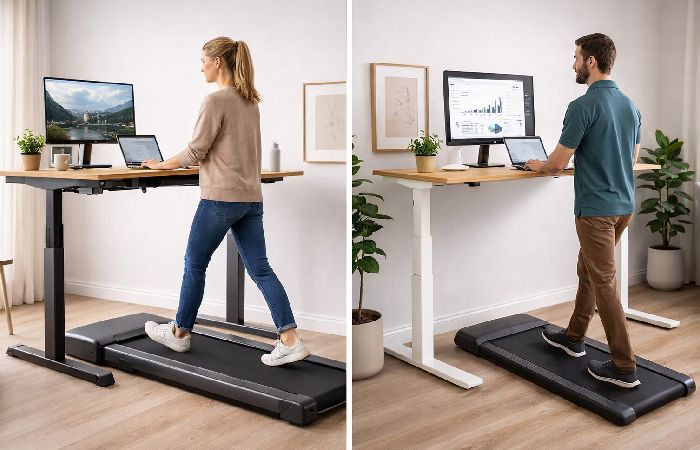
Not all treadmill desks are built the same. The right type depends on your workspace, budget, and how much you want to customize.
| Feature | Integrated Treadmill Desk | Under-Desk Treadmill (Walking Pad) | DIY Setup |
|---|---|---|---|
| What it is | Complete unit: treadmill + desk sold together | Compact treadmill that slides under an existing standing desk | Treadmill + desk arranged manually |
| Best for | Dedicated home offices with space | Flexible setups, smaller spaces | Budget-conscious users with existing equipment |
| Price range | $1,000–$2,500+ | $200–$800 | Varies widely |
| Ease of setup | Plug and play | Simple — pair with any standing desk | Requires trial and error |
| Portability | Low (heavy, large) | High (many fold flat for storage) | Medium |
| Noise level | Generally quiet | Varies by model | Depends on treadmill |
Integrated Treadmill Desks
These are purpose-built workstations where the treadmill and desk are designed to work together. Brands like iMovR and LifeSpan offer integrated units with optimized desk heights, cable management, and matched motor ratings.
Best for: Users who want a premium, no-compromise setup and have dedicated space.
Under-Desk Treadmills (Walking Pads)
Under-desk treadmills are the most popular option. They’re compact, foldable, and designed to slide under a standing desk you already own. Models from WalkingPad, Urevo, and Sperax are common choices.
Best for: Remote workers who want flexibility, portability, and a lower price point.
How to Set Up Your Treadmill Desk (Ergonomic Guide)
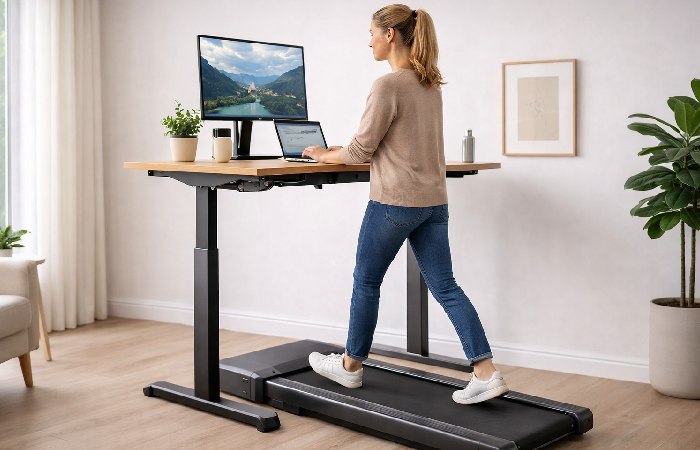
A treadmill desk only works if the ergonomics are right. Get the setup wrong, and you’ll create posture problems worse than sitting.
Desk Height and Monitor Placement
- Adjust your desk so your elbows bend at 90–120 degrees while typing. Remember to account for the treadmill’s step-up height (usually 5–6 inches above the floor).
- Position your monitor at arm’s length, with the top of the screen at or slightly below eye level.
- If you use multiple monitors, consider switching to one while walking. Turning your head side to side while in motion can strain your neck.
Following workplace ergonomic guidelines from NMSU’s Environment, Health & Safety department helps ensure a neutral body position that minimizes strain.
Keyboard, Mouse, and Posture
- Keep your wrists straight and parallel to the desk surface. A split keyboard or ergonomic keyboard can help.
- Use a trackball mouse instead of a standard mouse — it’s easier to control while walking.
- Stand tall with relaxed shoulders. Avoid leaning forward into the screen.
- Wear supportive walking shoes or athletic shoes. Slippers and bare feet increase fatigue and reduce stability.
The Sit-Stand-Walk Rotation Protocol
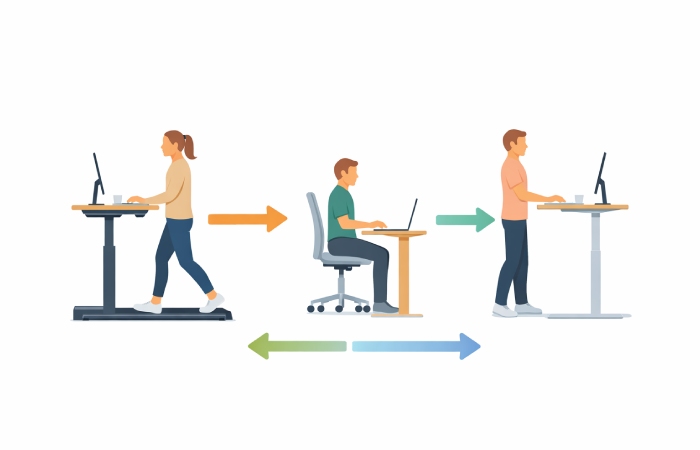
The biggest mistake treadmill desk users make is trying to walk all day. Your body needs variety. Here’s a structured rotation framework:
| Time Block | Position | Best Tasks |
|---|---|---|
| First 90 min | Walk (1–1.5 mph) | Email, Slack, light reading, phone calls |
| Next 60 min | Sit | Deep focus work, writing, complex analysis |
| Next 60 min | Stand | Meetings, brainstorming, reviewing documents |
| Next 90 min | Walk (1–1.5 mph) | Admin tasks, project updates, research browsing |
| Final 60 min | Sit | End-of-day wrap-up, detailed tasks |
Rules of thumb:
- Walk for tasks that require moderate focus (emails, calls, reading)
- Sit for tasks requiring high precision or deep concentration
- Stand for meetings and collaborative work
- Alternate positions every 60–90 minutes
- Start with 2 walking sessions per day and increase gradually
Treadmill Desk vs. Standing Desk
Both treadmill desks and standing desks reduce sitting time. But they’re not interchangeable. Here’s how they compare:
| Factor | Treadmill Desk | Standing Desk |
|---|---|---|
| Calorie burn | 100–130 cal/hr extra | 20–50 cal/hr extra |
| Movement level | Active (continuous walking) | Static (standing in place) |
| Noise | Some motor/footstep noise | Silent |
| Space needed | Large (treadmill footprint) | Moderate (desk footprint only) |
| Price range | $200–$2,500+ | $150–$1,500 |
| Learning curve | 2–4 weeks to adapt | Minimal |
| Best for | Extended active movement throughout the day | Reducing sitting with minimal setup change |
| Risk | Slight typing speed reduction | Leg/foot fatigue from prolonged standing |
When to Choose a Treadmill Desk
A treadmill desk makes sense if you want consistent, low-effort movement during work hours and your tasks don’t require precision mouse control. It’s ideal for remote workers, knowledge workers, and anyone managing a desk-bound job with limited exercise time.
When a Standing Desk Is Better
A standing desk is the simpler, quieter option. It works well in shared offices, requires no adaptation period for most tasks, and costs less. If you need absolute stability for precise work, standing beats walking.
The best approach for most people? A sit-stand-walk workstation that lets you alternate all three positions throughout the day.
Common Mistakes to Avoid
Most treadmill desk setups fail not because the product is wrong — but because the habits are. Here are the most common mistakes:
- Walking too fast — Anything above 2 mph makes typing, mousing, and reading significantly harder. Stick to 1–1.5 mph for work tasks.
- Wrong desk height — If your desk doesn’t account for the treadmill’s step-up height, your wrists and shoulders will pay. Measure carefully.
- Skipping proper footwear — Walking in socks, sandals, or bare feet increases fatigue and reduces stability. Wear supportive shoes.
- Trying to walk all day — The goal is movement variety, not maximum walking time. Use the sit-stand-walk rotation.
- Ignoring noise in shared spaces — Some treadmills produce 50+ dB at working speed. If you’re in a shared office or take frequent calls, test noise levels before committing.
- Not adjusting your gait — Take slightly longer, smoother strides. Short, choppy steps tire you out faster and create more vibration.
Who Should Use a Treadmill Desk — and Who Should Skip It
Best for:
- Remote and hybrid workers with a dedicated home office
- Knowledge workers (writers, developers, project managers, analysts)
- People managing weight or metabolic health goals
- Anyone spending 8+ hours/day seated with limited exercise time
Not for:
- Professionals doing precision-heavy tasks all day (graphic design, CAD, video editing) — the slight instability while walking makes fine mouse control harder
- People with balance or mobility restrictions — consult a physician first
- Very small workspaces — even compact walking pads need a clear 3×6 ft area
- Shared open offices where noise is a dealbreaker
Final Verdict
A treadmill desk is one of the most practical ways to reduce sitting time without overhauling your schedule. The health benefits are real and well-supported — better cardiovascular health, improved metabolism, lower back pain relief, and a genuine boost in creativity and focus.
But it’s not a miracle device. It works when you pair it with the right ergonomic setup, use it in rotation with sitting and standing, and match your task to the right position. Most users who quit within 3 months do so because they tried to walk all day from day one.
Start with two 60-minute walking sessions daily. Build from there. If your work is primarily email, calls, and reading — a treadmill desk can transform your workday without sacrificing productivity.
Frequently Asked Questions
Q: How fast should you walk on a treadmill desk?
A: Most users find 1–1.5 mph comfortable for typing and reading. Speeds above 2 mph tend to reduce typing accuracy and make mousing difficult. Start slow and increase gradually as you adapt.
Q: Can you lose weight using a treadmill desk?
A: Yes, but it’s gradual. Walking at 1.5 mph usually burns around 100–130 extra calories per hour compared to sitting, so the effect on weight is gradual and depends on your overall routine., so the impact on weight is gradual and depends on your overall routine. Over weeks and months, this contributes meaningfully to weight management — especially when combined with a balanced diet.
Q: Are treadmill desks noisy?
A: Many under‑desk treadmills produce around 45–54 dB at walking speeds — roughly equivalent to a quiet conversation — but actual noise levels can vary significantly by model, speed, and flooring. If you take frequent calls or share office space, test before buying.
Q: How long should you use a treadmill desk each day?
A: Many users end up walking about 1–3 hours per day, broken into 60–90 minute sessions, once they’ve fully adapted. The key is alternating between walking, standing, and sitting — not walking continuously all day.
Q: Is it hard to type while walking on a treadmill desk?
A: There’s a short adaptation period (1–2 weeks). Research shows a modest 9% dip in typing speed at walking pace. Most users adapt quickly, especially at speeds below 1.5 mph.
Q: Treadmill desk vs. standing desk — which is better?
A: Both reduce sitting risks. Treadmill desks burn significantly more calories and provide active movement, but require adaptation and space. Standing desks are quieter, cheaper, and simpler. The ideal setup combines both in a sit-stand-walk rotation.